
Mastering Tableau Agent in Pulse: A Complete Guide
Data visualization tools often excel at showing us what happened, but they frequently stumble when we ask why. Therefore, if you have ever stared at a Tableau metric and felt stuck on the follow-up, you are not alone. Traditional business intelligence platforms are fantastic for descriptive analysis. However, moving toward diagnostic insights is always a real challenge.
Fortunately, the digital landscape is shifting rapidly today. You can now leverage the power of generative artificial intelligence directly within your workflow. Enter the Tableau Agent in Pulse. This exciting evolution marks a major leap in how we interact with our data. It effectively bridges the gap between simple dashboards and deep, actionable business intelligence.
From Descriptive to Prescriptive: Why Tableau Agent Matters
Tableau Pulse has long served as a core staple for tracking key performance indicators. Yet, users frequently hit a wall right after their initial exploration phase. You might easily spot a dip in sales, but understanding the underlying root cause requires much more than a static chart.
Tableau Agent—formerly known as enhanced Q&A—changes this dynamic entirely. By seamlessly integrating Generative AI, it allows you to move far beyond surface-level observations. Consequently, you can now perform diagnostic analysis that probes deeply into your business metrics. This is not merely a cosmetic update; rather, it represents a fundamental shift toward an intelligent BI platform.
Getting Started: Accessing the AI Features
Before successfully harnessing this power, administrators must ensure their environment is configured correctly. For existing Tableau Cloud sites, teams have a golden opportunity to test this technology firsthand. Specifically, Salesforce provides an exclusive 60-day trial for the Tableau Agent.
Even if organizations do not currently operate a dedicated site, the feature remains fully accessible via standard cloud trial versions. Analysts can explore these advanced capabilities for up to 14 days. Remember, once trial periods officially end, utilizing the Agent requires a proper Tableau Pulse license edition.
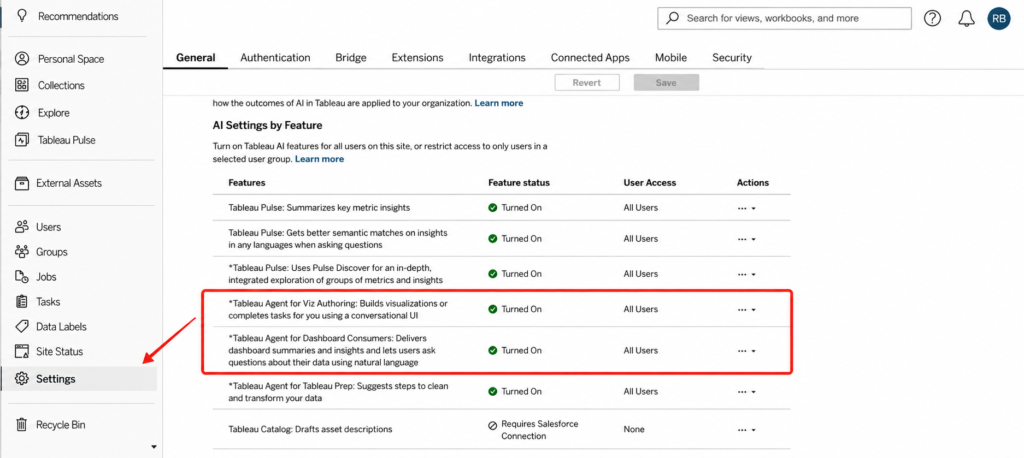
This screenshot highlights the specific settings area in Tableau Cloud where users must toggle on the new AI options. Ensure all toggles are active to successfully initiate the Agent.
Putting the Agent to the Test
To truly understand the difference, let us walk through a practical scenario together. Suppose you are monitoring a core profit metric. You might start by asking a standard, default question like what the current outliers are. Tableau will quickly identify them for you. Next, you might follow up by asking which region decreased the most.
The platform will promptly confirm that the West region shows the largest decline. While this information is helpful, it remains purely descriptive. You still have no idea why the West region is struggling. This is precisely where the traditional experience stops and the advanced AI experience begins.
Asking the Probing Business Question
Now, let us push our analytical boundaries further. Imagine you want to know whether a few large customers are responsible for most losses, or if the issue is spread across many small orders. This represents a complex, multi-dimensional question.
When asking this in standard Pulse, the system might fail to find an answer. Consequently, it will gracefully redirect you with a prompt: “Did not find what you’re looking for? Try Tableau Agent in Pulse to dig deeper.” This serves as your direct gateway to Generative AI.
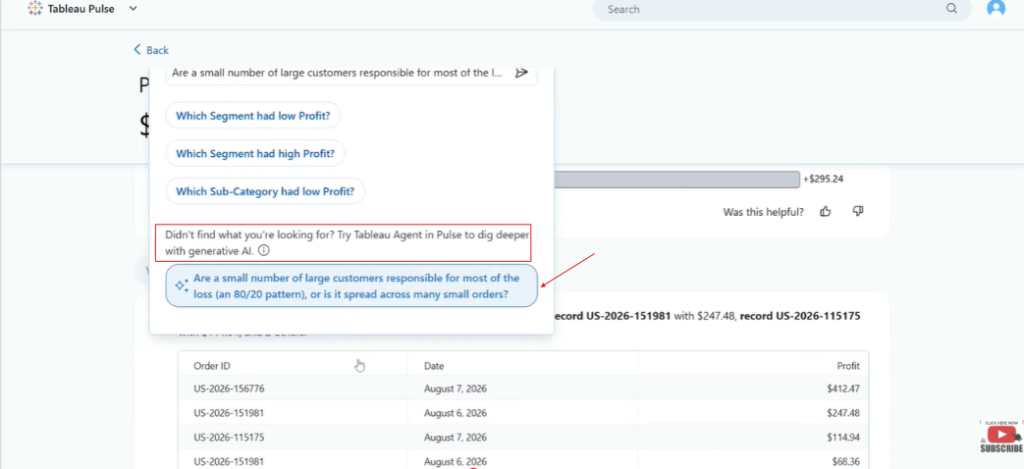
An image showing the “No result” message from the standard interface alongside the blue prompt button that invites the user to switch to the Tableau Agent.
Analyzing Results with Generative Intelligence
When clicking the Agent button, the real magic happens. The AI immediately begins to analyze requests against all available data. In our scenario, the Agent might report that it lacks sufficient data to isolate profit drops strictly by customer.
Crucially, the Agent does not just say it does not know. Instead, it explains why. It might reveal that current insights break down decreases by product subcategory, segment, or city—rather than by individual customer.
Furthermore, it informs you that order-level records show positive values, which directly contradicts overall profit loss. This level of transparency is exceptionally invaluable. Analysts are no longer guessing blindly; instead, they understand platform limitations and actual business drivers.
Intuitive Takeaways and Alternative Paths
The Agent provides a clear summary of top detractors. It directs your focus toward specific product subcategories or regions that are actually driving the decline. Furthermore, it suggests alternative questions to help you refine your investigation.
This feedback loop turns a dead-end query into a learning opportunity. You gain a clearer picture of your business health without needing to build new dashboards from scratch.
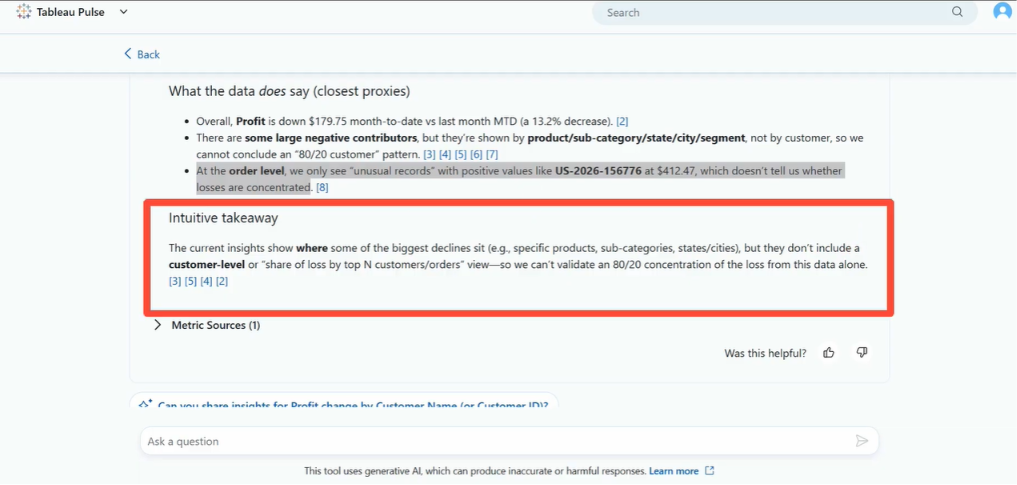
This image displays the final analysis box provided by the Agent. Highlight the clear explanation of why it focused on subcategories rather than customers, and the suggested follow-up questions.
Security and the Einstein Trust Layer
Data security remains the primary concern for any enterprise adopting AI. You might worry about your proprietary metrics being used to train external models.
Tableau Agent is built on top of the Salesforce Einstein Trust Layer. This is a robust framework designed specifically for business safety. It automatically detects sensitive data, such as Personally Identifiable Information (PII). It masks this information before sending any prompts to the Large Language Model (LLM).
Consequently, your data is never retained by the LLM provider. It is never used to train the global model. You can confidently explore your data, knowing that your sensitive business information remains secure and private.
Conclusion: Elevate Your Data Journey
Transitioning from descriptive charts to intelligent, diagnostic insights is essential for modern businesses. The Tableau Agent in Pulse simplifies this journey by putting powerful tools directly into your hands. It helps you ask better questions, understand underlying metrics, and maintain complete peace of mind regarding data security.
If you are new to the platform, do not worry. There are extensive resources available to help you set up metrics quickly. Explore these tools, test the agent today, and start uncovering deeper truths hidden within your data.
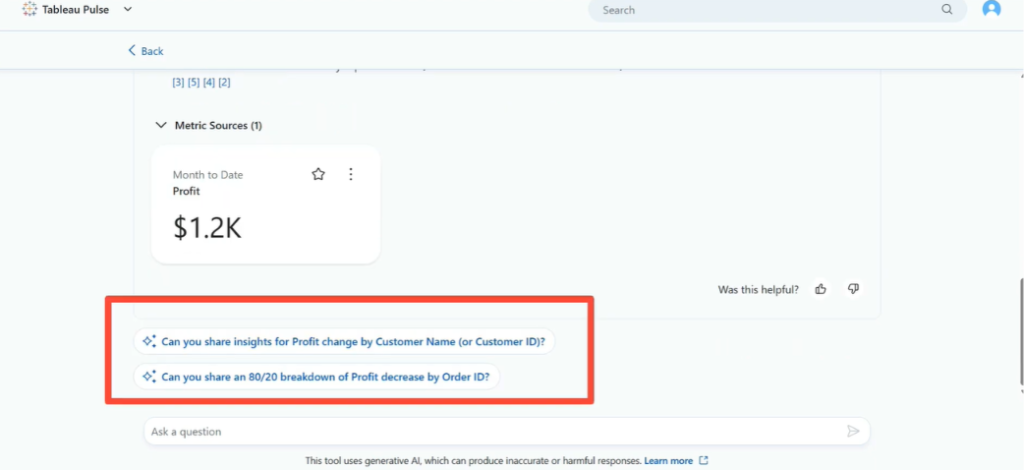
A clean screenshot showing the final, successful dashboard state after the AI analysis has provided actionable insights, demonstrating the value of a well-configured Pulse environment.
Watch the Full Video Tutorial
To see this entire process executed in real time, check out the full video below. You will see exactly how the folder structures look, how Claude handles the zip files, and how the donut chart pops up live on the canvas.
Video Link: Watch the Tutorial on YouTube : Tableau Pulse + Agent: Ask Deeper Questions
You might also enjoy this insightful blog on Power BI : Tableau AI Agent
To download the latest version of Power BI Desktop compatible with project file tracking, visit the official Microsoft Power BI Download Center download
Note: If you want to get direct access to the sample project files and templates used throughout this demonstration, drop an email to support@dancesingwithdata.com , and we will share them straight to your inbox. Until next time, keep on dancing with data.
