Power BI Claude MCP: 5 Game-Changing Workflows for Data Teams
Login
Power BI Claude MCP: 5 Game-Changing Workflows for Data Teams
Power BI Claude MCP: 5 Game-Changing Workflows for Data Teams
Connecting your Power BI desktop MCP connector with Claude changes your workflow. Indeed, this advanced Claude MCP integration easily optimizes patchy datasets. Consequently, it saves hours of manual development. However, what should you do next? Therefore, here are five tasks to execute inside your Power BI semantic model.
1. Automated Data Model Documentation
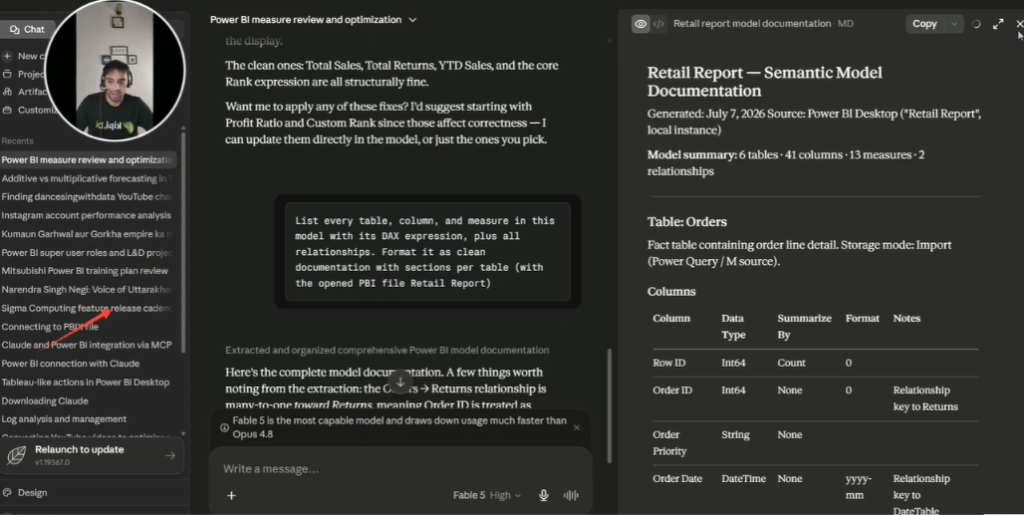
Writing comprehensive schema documentation is tedious. Furthermore, developers rarely have spare time. Fortunately, the Power BI Claude MCP setup automates this instantly. Specifically, it documents tables, columns, and relationships. Additionally, you only need one simple prompt. As a result, the AI generates clean sections per table.
Creating instant data model documentation using the Power BI desktop MCP connector.
2. Audit DAX Formulas and Explain Code
Legacy expressions often cause massive headaches. For example, former employees leave unoptimized code. Therefore, use this toolkit to audit DAX formulas.
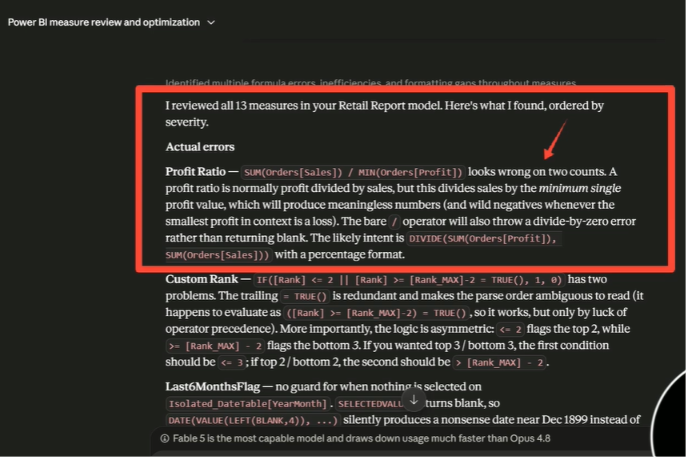
First, the assistant explains complex logic clearly. Second, it highlights critical calculation errors. In addition, it suggests modern functions like DIVIDE.
Auditing DAX formulas to identify calculation errors and performance improvements.
3. Instant DAX Measure Creation
You can build new metrics by asking naturally. Simply name your target calculation. Tell the assistant to save it to your specific metrics table. It writes clean code immediately.
The system handles complex blank values automatically. It verifies the final calculation expression instantly.
4. Natural Language Data Q&A
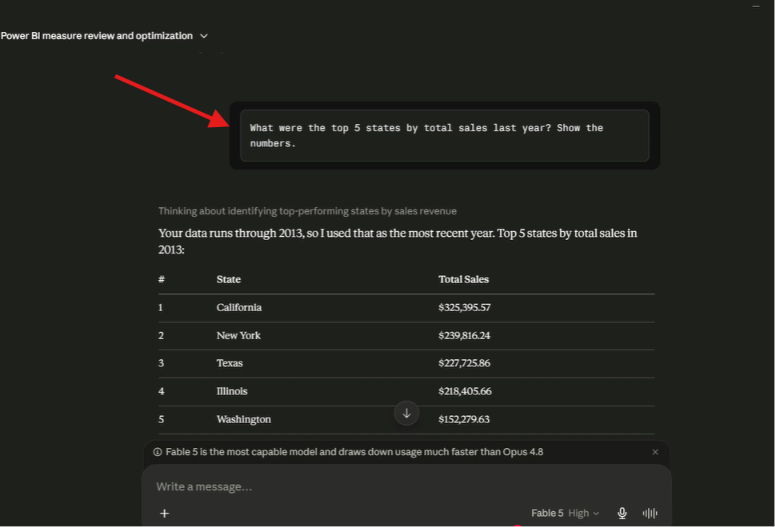
Moreover, you can query data using text. Indeed, you do not need complex code. For instance, ask for performance metrics. As a result, the engine processes prompts fast.
It provides deep business context automatically. You learn exactly which regions lead your market.
Querying the Power BI semantic model using plain natural language.
5. Troubleshoot Power BI Model Integrity
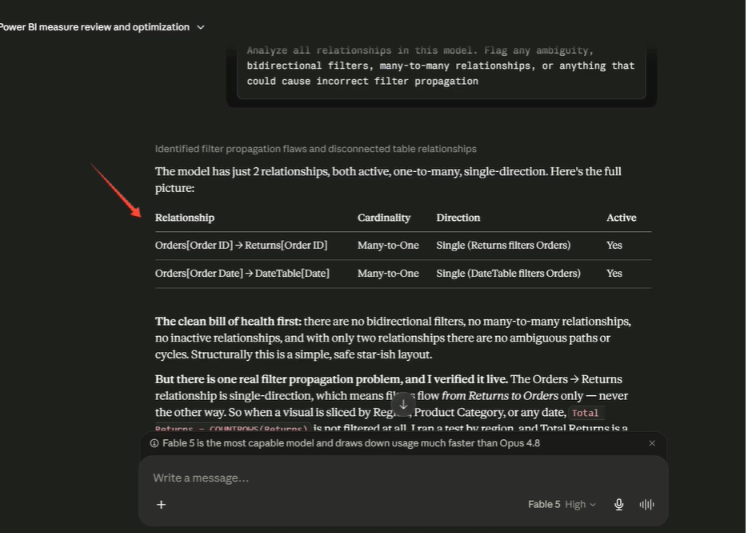
Relationship errors cause bad business reporting. Therefore, use this protocol to troubleshoot Power BI model logic. Specifically, it flags bidirectional filters. Additionally, it identifies many-to-many structures.
The tool provides three distinct ways to fix schema errors. It catches disconnected tables easily.
Spotting filter propagation issues and disconnected tables using Claude MCP.
Summary & Key Takeaways
The integration of the Power BI desktop MCP connector with Claude MCP bridges the gap between AI and semantic modeling. This setup automates time-consuming development tasks. It helps analytics teams document, optimize, query, and troubleshoot their data models using plain language.
Key Takeaways
Instant Schema Documentation: Automates the tedious task of documenting tables, columns, and relationships. It generates clean documentation in minutes.
Pain-Free DAX Auditing: Automatically reviews legacy code, flags calculation errors, and explains DAX logic in plain English.
Natural Language Q&A: Allows developers and stakeholders to ask questions directly to their data model without writing code.
Proactive Model Troubleshooting: Swiftly identifies model relationship errors, bidirectional filters, and filter propagation issues.
Strict Semantic Focus: The integration strictly modifies and queries the backend semantic model. It cannot modify visual elements or front-end charts.
Watch the Full Video Tutorial
To see this entire process executed in real time, check out the full video below. You will see exactly how the folder structures look, how Claude handles the zip files, and how the donut chart pops up live on the canvas.
To download the latest version of Power BI Desktop compatible with project file tracking, visit the official Microsoft Power BI Download Center download
Note: If you want to get direct access to the sample project files and templates used throughout this demonstration, drop an email to support@dancesingwithdata.com , and we will share them straight to your inbox. Until next time, keep on dancing with data.